


Understanding the complexities of website analytics can be frustrating, especially when your business operates across multiple domains or subdomains. Knowing how users interact across your digital landscape is essential for optimizing conversion paths and improving user experience. This guide details the intricacies of cross-domain and subdomain tracking, providing you with actionable insights to implement these practices using Google Analytics (GA4).
What is Cross-Domain & Subdomain Tracking?
Cross-domain tracking is a technique used to track user interactions across different top-level domains. This type of tracking is essential for businesses that manage multiple domains and need to understand the user journey from one domain to another. For example, a user might start their search on a corporate site and complete a purchase on a separate e-commerce site.
Subdomain tracking, meanwhile, monitors user behavior across various subdivisions of the same domain. If your main site is example.com, you might also host a blog at blog.example.com and a shop at shop.example.com. Tracking how users move between these subdomains helps in understanding their engagement and behavior on each part of the site.
For a deeper understanding and official guidelines from Google on setting up these tracking mechanisms, visit their help page on cross-domain tracking.
When to Use Cross-Domain & Subdomain Tracking
Businesses need cross-domain and subdomain tracking to capture accurate data on user interactions that span multiple domains or subdomains. This capability is vital for seamless tracking of user activities that directly impact business metrics such as conversions and user retention. These scenarios often include:
- eCommerce: Where a user browses products on one domain and completes their purchase on another.
- Lead generation: Where different subdomains serve various parts of a funnel, such as information gathering and form submission.
- Content hubs: Where a business maintains distinct thematic sites, such as news platforms or product-specific blogs.
Implementing multiple GA4 property tags as suggested in Google’s documentation on adding multiple tags is essential as this setup allows businesses to maintain data continuity and integrity across their digital properties. This ensures that every user action is tracked and attributed correctly.

Steps for Setting Up Cross-Domain & Subdomain Tracking in GA4
Setting up cross-domain and subdomain tracking involves several crucial steps to ensure that data flows seamlessly between various parts of your digital ecosystem:
- Create or Modify Your GA4 Property: Ensure it is set to track the correct domains.
- Configure Your Data Stream: Include each domain or subdomain you want to track.
- Implement GA4 Tags: Place tags on every page of your domains and subdomains.
- Configure Cross-Domain Measurement: Link the domains together for accurate tracking.
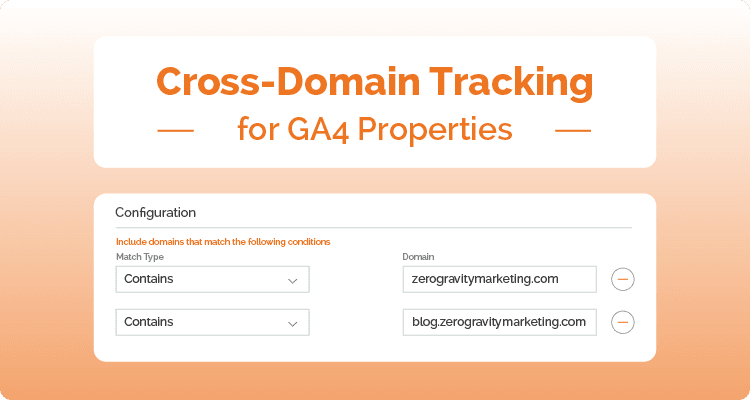
Each step is designed to build upon the previous and layer together effectively to create a robust framework for your analytics. By methodically setting up each component, businesses can achieve a detailed view of their user interactions across multiple domains and subdomains.
Challenges in Cross-Domain & Subdomain Tracking
While the benefits of cross-domain and subdomain tracking are significant, several issues may arise, including technical complexities and privacy concerns. The main problems include:
- Technical Complexity: Proper implementation requires in-depth knowledge of GA4 settings and tag management.
- Data Integrity: Ensuring accurate and consistent data collection across all domains and subdomains can be difficult.
- Privacy Concerns: Adhering to privacy regulations such as GDPR may limit the scope of tracking across domains.
Despite these frustrations, strategic planning and execution can provide workarounds that respect user privacy while still capturing essential data for business analysis.
The Business Benefits of Effective Tracking
Implementing cross-domain and subdomain tracking provides multiple benefits that can change a business’s approach to digital marketing and user experience design:
- Better User Insights: Gain a complete view of the customer journey across all digital properties.
- Improved Marketing Strategies: Understand which domains and paths are most effective at driving conversions.
- Optimized Ad Spending: Redirect resources to channels and domains that offer the highest ROI.
- Better User Experience: Identify and rectify friction points in the user journey.
These benefits highlight the importance of a detailed and integrated tracking system that informs strategic decisions and drives operational efficiencies.

Look to Zero Gravity Marketing for Assistance
As businesses continue to expand their digital footprints, the need for sophisticated tracking methods like cross-domain and subdomain tracking becomes more critical to evaluate website performance. These practices are not just about gathering data; they are about gaining insights that drive business growth, increase user satisfaction, and streamline marketing efforts. Looking forward, the evolution of analytics technologies promises even more capabilities for businesses ready to invest in their digital infrastructure and data-driven strategies.
Setting up and managing cross-domain and subdomain tracking can be intricate, and if you’re looking to leverage these capabilities but aren’t sure where to start, Zero Gravity Marketing can assist! Our expertise in GA4 setup and Google Analytics subdomain tracking ensures that your tracking is configured correctly, providing you with reliable data to inform your business decisions.