



Understanding Website Downtime
Website downtime isn’t just an inconvenience to your daily life – it’s a critical issue that locks out users and disrupts the flow of your business. Understanding why your website is offline and quickly resolving the issue is critical to keeping your visitors happy and your operations running smoothly.
Common Causes of Website Downtime
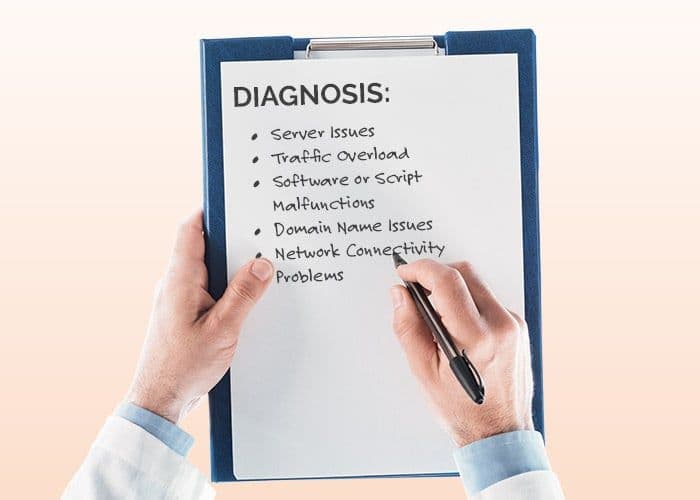
Server Issues
A malfunctioning or overloaded server can cause website downtime. If your hosting provider’s server experiences hardware failures or scheduled maintenance, users will find your site unavailable. Verify the server status through your hosting provider to confirm if this is the reason.
Traffic Overload
Sudden surges in traffic can overwhelm servers without sufficient resources, leading to poor response times, increased downtime and frustrated website visitors. This often occurs during high-demand events or unexpected spikes. Use scalable hosting plans or Content Delivery Networks (CDNs) to handle increased traffic and prevent website downtime.
Software or Script Malfunctions
Bugs in website scripts or errors in installed software can make your website not work as expected. Regularly update software, plugins, and themes to avoid conflicts or outdated components causing poor load time or even downtime.
Domain Name Issues
Expired domain names or incorrect DNS settings can render your website inaccessible. Check if your domain is active and ensure DNS records are correctly configured to keep the website operating smoothly.
Network Connectivity Problems
Issues on your internet service provider’s end or with your hosting provider’s network connectivity can cause outages. Confirm network stability and communicate with your provider to resolve extended disconnections.
How to Check If Your Website Is Down
Catching website downtime early is key to minimizing disruptions for your visitors and smoothing out any bumps in your business operations. Arm yourself with the right tools and strategies to pinpoint whether the hiccup is on your site, the server, or somewhere else. Quick detection means quicker fixes!
Why Checking Website Status Is Important
Monitoring website status ensures uninterrupted user experience and reduces downtime-related losses as downtime can negatively affect visitor’s trust in your website. Unfortunately, this can lead to lower SEO rankings and even revenue.
Detecting downtime promptly helps you act before the situation worsens. When users encounter errors like “Website not working” or “Service unavailable,” they may leave and not return. Confirming issues early allows you to implement solutions like contacting hosting providers or identifying DNS misconfigurations. Real-time monitoring tools, such as UptimeRobot, can prevent such incidents with instant notifications.
Checking website status also identifies recurring issues, enabling necessary upgrades and fixes. For instance, scalable hosting plans and CDNs address traffic overloads, while SSL renewals prevent access denial due to certificate errors.
Methods to Check If a Website Is Down
Using Online Monitoring Tools
Leverage online website checker tools like DownDetector, Pingdom, or IsItDownRightNow to verify downtime. These platforms analyze responses from multiple servers, confirming if the issue is global or specific to your website. Accessible interfaces and immediate outputs make them reliable options for rapid checks.
Checking Through Web Browser
Refresh your website in your browser’s incognito mode. If your site still doesn’t load, try accessing other websites to verify your internet connection. A cache-clearing command such as Ctrl+F5 (Windows) or Command+Shift+R (Mac) ensures outdated browser data doesn’t block website access.
Monitoring Social Media for User Reported Outages
Search social platforms such as X (Twitter) or Reddit for outage-related posts about your site. Users may report “My website is down” or similar issues, confirming if it’s a widespread problem. While social platforms can’t replace technical diagnostics, they provide real-time insights about outages affecting a broad user base.
How to Troubleshoot a Down Website
If your website is down, troubleshooting effectively helps identify and resolve the issue quickly. Follow these steps to determine why your website is not working and minimize downtime.
Diagnosing Server Problems
Server issues often cause downtime, so check your hosting provider’s server status page or dashboard to see if there’s an outage. If you can’t access this information, use third-party tools like Pingdom or UptimeRobot to check the server’s status.
Overloaded hosting plans, especially shared hosting, can lead to downtime during traffic spikes. Upgrading to a scalable plan or using a Content Delivery Network (CDN) can prevent server-related issues.
Restarting the server or contacting your hosting provider might help resolve specific server-side problems if within your control.
Testing Network Connectivity
Rule out local network issues by testing your internet connection. Run a site speed test using tools like Speedtest by Ookla or Fast.com. Confirm you’re not experiencing slow browsing or intermittent disconnections.
Use network diagnostics like the “ping” or “tracert” commands on your device to test connectivity to your website. An unreachable server in these tests indicates external network issues.
Disconnect from VPNs or proxies, as they might block your website. Test the website on another device or network to confirm the issue isn’t isolated to your local environment.
Reviewing Recent Changes or Updates
Review recent website updates or configuration changes. New plugins, theme updates, or code modifications might create conflicts, leading to errors or downtime. Deactivate newly installed plugins or revert to the last working version of your site if it’s a WordPress website.
Check for script errors in the browser’s developer console. Unfixed bugs in scripts or applications can cause crashes or failure to load.
Always back up your website regularly to recover quickly in case recent changes disrupt functionality. Keep staging environments for testing updates before implementing them live.
When to Contact Your Hosting Provider
It’s best to contact your hosting provider if you’ve exhausted other troubleshooting steps and your website is still down. Hosting support teams can access server logs, investigate backend issues, and provide solutions that aren’t accessible to you.
If you’re receiving status code errors like “500 Internal Server Error” or “504 Gateway Timeout,” hosting providers can confirm if the problem is server-related. Provide as much detail as possible about errors, recent changes, and troubleshooting steps already taken.
If downtime persists or outages occur frequently, consider migrating to a more reliable hosting service. High uptime guarantees and 24/7 support are essential for preventing website downtime.
Strategies to Prevent Website Downtime

Choosing a Reliable Hosting Provider
Select a hosting provider with a proven uptime track record. Look for guarantees of at least 99.9% uptime and robust customer support. Evaluate their hosting plans to confirm they can scale with your traffic demands. Providers offering cloud-based solutions or Content Delivery Networks (CDNs) often reduce risks of server failure caused by high traffic. For instance, shared hosting may not suffice during periods of heavy site activity, so upgrading to VPS or dedicated hosting might be necessary. Verify if the provider includes real-time server status monitoring.

Implementing Continuous Monitoring
Use tools like UptimeRobot or Pingdom to monitor your site. These popular tools send alerts the moment downtime occurs, enabling quick responses. Set up automated checks every few minutes to track accessibility and loading speeds. Monitoring helps identify recurring issues, such as server overload or DNS errors. Combine these tools with analytics platforms to evaluate how downtime impacts user engagement and conversions. Proactive monitoring prevents prolonged disruptions.

Optimizing Website Performance
Increase speed and reliability by optimizing images, reducing HTTP requests, and enabling browser caching. Use a CDN to distribute content across multiple servers, minimizing the load on the primary server. Regularly test your website’s performance metrics through tools like Google PageSpeed Insights while ensuring scripts and plugins are updated to prevent slowdowns or conflicts. Optimize your database to remove redundant data, reducing resource consumption and ensuring faster loading times.

Regular Backups for Quick Recovery
Schedule automatic backups to safeguard against data loss by creating full-site backups that include files, databases, and configurations. Store backups off-site or in the cloud to protect against local hardware failures – you can also utilize tools like BackupBuddy or platform-native options like cPanel backups. Regular backups help restore your site swiftly, minimizing downtime effects. Be sure to periodically test backup integrity to ensure recovery processes are reliable during critical situations.

Increasing Security Measures
Protect your website from cyber threats like DDoS attacks, malware, and hacking by implementing firewalls, activating SSL certificates, and using web application security tools. Regularly update software and plugins to patch vulnerabilities and enforce strong password policies for all users. Use anti-malware solutions and monitor security logs to detect suspicious activities. Remember that strong security measures reduce the likelihood of downtime caused by unauthorized access or attacks!
When to Call in the Experts
Website downtime can sometimes exceed your technical expertise, requiring professional intervention to ensure minimal disruption. If routine troubleshooting doesn’t resolve the issue, reaching out to professionals prevents exhaustive downtime and potential revenue loss.
How ZGM Can Help with Website Maintenance
ZGM offers advanced website maintenance services to diagnose and resolve downtime issues and crashes effectively. If you’re asking, “Why is my website down?” or struggling to find a specific cause, ZGM’s professionals provide in-depth analysis of server performance, DNS configurations, and website code. They help identify vulnerabilities, resolve server connectivity issues, and optimize your site for uninterrupted uptime.
Regular maintenance reduces the likelihood of issues like expired SSL certificates or server resource depletion. ZGM also provides real-time monitoring to reduce downtime durations. Our expertise ensures your website remains operational while boosting stability and security. Addressing downtime isn’t just about recovery-it’s about prevention.
Our Hosting and Maintenance Solutions
ZGM’s hosting and maintenance solutions include robust tools to help prevent website downtime. With scalable hosting plans, you can handle traffic surges without overloading your server. If “my website is down” is a recurring Google search on your company computer, consider ZGM for a reliable hosting environment with a guaranteed uptime record.
Did we mention our services also include DNS setup, regular backups, and automated updates to avoid compatibility issues? Built-in security measures protect against cyber threats that often lead to website failures. For businesses keen on learning how to prevent website downtime, we provide tailored strategies and continuous monitoring. By upgrading your hosting infrastructure, your website stays fast, secure, and accessible!
FAQ
- Ping Tools: Check server reachability.
- Website Monitoring Services: Use tools like Uptime Robot or Google PageSpeed Insights to monitor availability and speed.
- Manual Checks: Access the site from various devices and networks to see if issues are consistent.
- Website Monitoring Tools: Tools like Pingdom or Site24x7 alert you to downtime immediately.
- Content Delivery Networks (CDNs): A CDN can reduce server load and improve content delivery speed.
Backup Solutions: Ensure regular backups and a solid recovery plan to quickly restore service if needed.