
If you’ve just launched a new website or are working on making your current one stand out, getting Google to index your pages quickly is crucial. When Google indexes your site, it means your content can start appearing in search results – driving traffic and helping you outrank competitors. So, how do you get Google to notice your site fast? Here’s a simple, effective guide with the best ways to make it happen.
What is Google Crawling and Indexing?
Let’s start by breaking down the basics and definitions of crawling and indexing.

Crawling: Crawling is the process where Google’s automated bots, known as Google crawlbots or Googlebots, scan and analyze your website. Googlebots “crawl” the internet, visiting web pages to gather information.

Indexing: After crawling, Google decides if the page should be included in its database, a process called indexing. When a page is indexed, it’s eligible to appear in search results when someone searches for relevant keywords.

Googlebots: Googlebots are the “spiders” or “crawlers” Google uses to discover new web pages and check for updates. They play a major role in determining if and when a page will be indexed.

Ranking Pages: Once a page is indexed, it becomes eligible to rank. Ranking refers to where your page appears in search results for certain keywords. The more relevant and optimized the page, the better its chance of ranking high on Google.
How to Know if You’re Indexed by Google
Wondering if Google has already indexed your site? Here’s how to find out:
- Site Search: Go to Google and type site:yourdomain.com (replacing “yourdomain.com” with your actual URL). If your pages are indexed, they’ll appear in the search results.
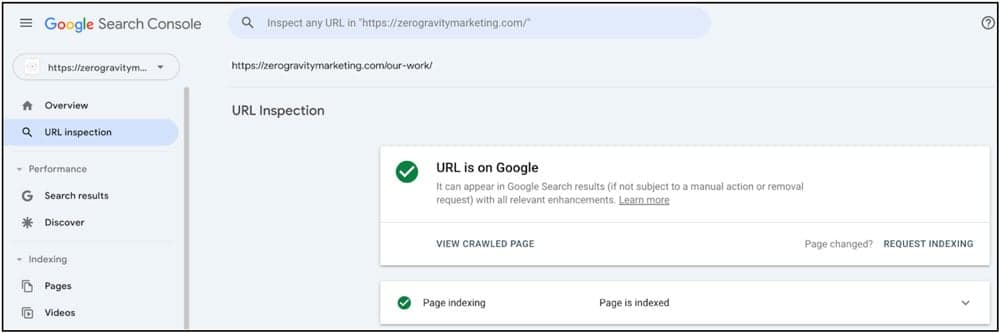
- Google Search Console (GSC): Google Search Console is a free tool that lets you track your site’s indexing status, see any crawling issues, and request indexing for specific pages. Setting up GSC is essential for monitoring and managing how Google interacts with your site.
How Do I Get Google to Index My Site?
1. Add Your URL to Google Search Console and Request Indexing
One of the quickest ways to get Google’s attention is to manually add your URL in Google Search Console (GSC) and request indexing. Just enter your URL, hit “Request Indexing,” and Google will prioritize it for faster crawling.
2. Build Quality Content
Google is all about content that provides value. By creating high-quality articles, guides, and resources, you’re not only attracting visitors but also increasing the likelihood that Googlebots will crawl and index your site. Quality content is one of the most important factors for indexing and ranking.
3. Manage Your Noindex and Canonical Tags
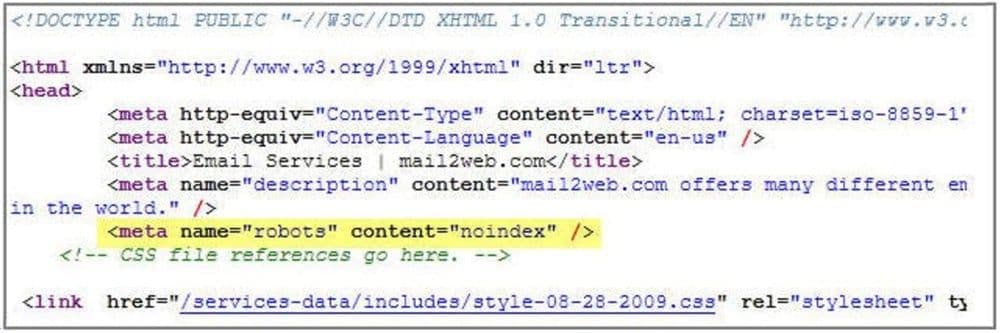
Use noindex tags to prevent certain pages from being indexed (like outdated or low-value content). Canonical tags, on the other hand, tell Google which page version is the “main” one if similar content appears in multiple places. Proper use of these tags ensures Google indexes the right pages, keeping your site structure clean and optimized.
4. Remove or Revise Low-Quality Pages
If you have old or thin content on your site, consider revising or removing these pages. Google values fresh and relevant information, so updating content or removing low-quality pages can encourage more frequent crawling. It also signals to Google that your site is well-maintained.
5. Include Your URLs in an Updated Sitemap
An XML sitemap is like a roadmap of your site, guiding Googlebots to your most important pages. Make sure your sitemap is up-to-date with all URLs you want indexed, and submit it to Google Search Console. For more on creating an effective sitemap, check out our Guide to XML Sitemaps.
6. Improve Internal Linking and Site Structure
Internal links help Googlebots discover your content more effectively. By linking to new pages from other parts of your site, you give Google an easy path to find and index them. A clear and organized site structure also helps both users and bots navigate your site with ease.
7. Increase Your Speed Scores
Google prioritizes fast-loading websites because they provide a better experience for users. Slow-loading pages may be crawled less frequently, so optimizing your site’s speed can encourage faster indexing. Use tools like Google PageSpeed Insights to identify speed issues and make improvements.
Learn more about improving your Google rankings
8. Build High-Quality Backlinks
Backlinks (links from other reputable websites pointing to your site) help increase your site’s authority. When Google sees that other trusted sites are linking to your content, it’s more likely to prioritize crawling and indexing. Focus on building quality backlinks from relevant, authoritative sources.
9. Partner with ZGM for a Winning SEO Strategy
Getting your website indexed fast doesn’t have to be a guessing game. By following these steps – creating quality content, refining your site structure, and leveraging Google’s tools – you can get your site noticed and indexed quickly. And if you need a little extra help, Zero Gravity Marketing has the experience and expertise to make it happen.
Ready to give your site a boost? Contact ZGM today and let’s get your content in front of the right audience.